Register your Uniconta accounts for Nemhandel yourself.
The benefits of Nemhandel and OIOUBL
OIOUBL helps automate and standardize the processes of e-invoicing, data exchange and business documents between companies and public institutions. Some of the benefits of OIOUBL include:
- Data is read with 100% accuracy as OIOUBL is a structured format
- Security is in order as documents are sent encrypted via Nemhandel
- Receive invoices from your vendors directly in the Physical Inbox in Uniconta. From here, the invoice can be transferred to a Purchase Order or compared to an already created Purchase Order or simply transferred to a General Journal
- Receive orders from your customers and have them automatically created as a sales order in Uniconta
- Receive account statements from your vendors directly in the Physical Inbox
- With the new Bookkeeping Act, enterprises that must use a standard digital bookkeeping system will now be able to send and receive e-invoices and other documents that can be sent via Nemhandel. This means that virtually all business partners will be able to send invoices and possibly orders via Nemhandel if the Uniconta accounts are registered for Nemhandel.
In order to receive OIOUBL documents via Nemhandel, the accounts must be registered in the Nemhandel Register (NHR) with a VAT-no and/or a gln number and the Nemhandel provider must be Uniconta.
It’s easy to get started as you can register your enterprise for Nemhandel directly from Uniconta. Below is a description of how to do this.
Note: It is possible to register more than one gln number for a Uniconta account. Read more in the section ‘Register the accounts for Nemhandel (Company addresses)’
Note: It is also recommended to check whether your own customers can receive e-invoice via Nemhandel. The customers can then be updated so that Uniconta can send e-invoices via Nemhandel. This will also provide many administrative benefits. Read more about the topic here.
VAT-no or gln number
It is free to register in the Nemhandel Register with your VAT-no and for most enterprises this will be a good solution.
However, in some situations it may be an advantage to purchase your own gln number and then register with this in NHR.
If you are an enterprise that needs multiple registrations on the same VAT-no in NHR, it may be an advantage to obtain a gln number.
It is possible to be registered with both a VAT-no and a gln number.
A gln number can be purchased via the standardization organization GS1 Denmark. It costs a yearly fee, which depends on the enterprise’s yearly revenue.
A gln number has 13 digits.
Then enter the gln number under Company information.
Note: When you have registered your enterprise in NHR, it will be visible to other enterprises and public institutions. You should therefore expect that invoices and other registered documents will be sent via Nemhandel.
Many ERP systems have a system that checks whether the receiver is registered in NHR and if so, the document is sent via Nemhandel instead of sending an email with an attached PDF document.
The Nemhandel Register
There are +90,000 receivers registered in NHR and that number is increasing, so there are many who can send and receive UBL documents. These are both public and private enterprises, which are registered in NHR with their gln number (also called ean number) or a VAT-no.
As a result of the Bookkeeping Act, the potential is +416,000 enterprises, which is all enterprises in Denmark.
Register the accounts for Nemhandel (Company information)
Under Company information, click the ‘Sign up for Nemhandel’ button.
Then it is checked whether the current VAT-no and possibly gln number are registered in NHR.

In the example below, there are no registrations in NHR for the current VAT-no. If you click Ok, the VAT-no below will be created in NHR and you will then be able to receive invoices directly in Uniconta.
The following documents can be received in Uniconta. Read more about receiving documents via Nemhandel here.
Receive invoice
By default, you will always be able to receive invoices. Therefore, this cannot be registered/unregistered.
The following documents are also part of Default: Credit note, Collection letter, Utility specification (UTS) and receipts.
The documents are loaded directly into Physical vouchers (inbox)
Receive order
The order is created directly as a sales order when it is received via Nemhandel.
Receive account statement
Account statements are loaded directly into Physical vouchers (inbox)
Tick ‘Receive order’ and/or ‘Receive account statement’ if you want to receive these types of documents via Nemhandel.
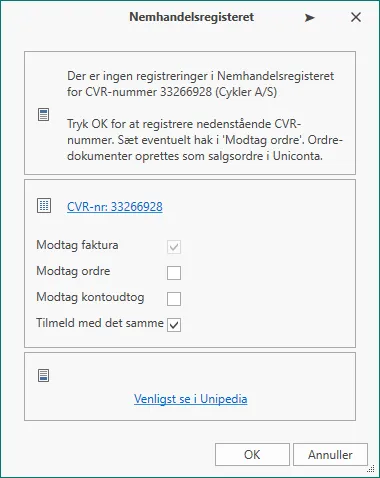
Above, ‘Register immediately’ is ticked. By removing the tick, you can choose when you want the registration to be activated.

In the example above, the registration will be activated on 30/06/2024 at 23:50.
Note: If a future activation time is specified, you should be aware that it can take up to 24 hours before the registration is created. This is due to the SML batch jobs behind the registration. The delay between the activation time and when the registration is actually production-ready is because the lookup register (the SML) is only updated at 5:30 every morning.
If you have a gln number, enter it under Company information and it will then be what is registered in NHR. Below is an example where a gln number is specified.

If you are registered with a VAT-no and then obtain a gln number, simply enter it under Company information and then you can register the gln number in NHR. You will now be registered with a VAT-no and a gln number. You can then consider unregistering the VAT-no, but it is perfectly legal to be registered with both.
Register the accounts for Nemhandel (Company addresses)
It may be necessary to be able to create more than one gln number for the same Uniconta account.
Example: An enterprise with multiple departments that are all linked to the same Uniconta account, but each has its own gln number.
Under Company address, click the ‘Sign up for Nemhandel’ button for the current address.
Then it is checked whether the current gln number is registered in NHR.

The function is then the same as described in the section ‘Register the accounts for Nemhandel (Company information)’
Change registrations in NHR
It is also possible to change the registrations in NHR.
Note: By clicking the underline of the gln number, the registrations in NHR will be displayed in a browser window.

The gln number above is registered in NHR. It is possible to change it so that you can receive Orders and/or Account statements.
It is also possible to unregister a registration in NHR.
Unregister
If you tick Unregister, you will be able to unregister the registration immediately. If you remove the tick in ‘Unregister immediately’, you will be able to choose a specific time of unregistration.

Registered with another provider
If you get the image below, it is because the VAT-no is registered in NHR via a provider other than Uniconta.
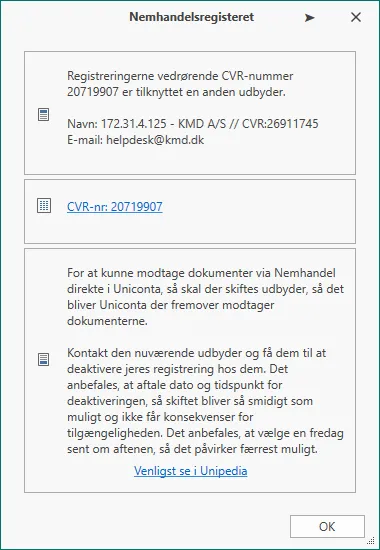
If you want to receive documents directly in Uniconta, the Nemhandel provider must be changed to Uniconta.
Here is an instruction note on how to do it.
Contact the current provider and have them disable your registration with them. The email address is stated in the dialog, otherwise click the link with the VAT-no. This will open a browser window with the registration in NHR. Here you will be able to find further information about the registration.
It is recommended to agree on the date and time of the deactivation so that the change is as smooth as possible and does not affect availability. It is recommended to choose a Friday late in the evening so that it affects as few as possible.
When the current provider has deleted the registration or specified an end date for the registration, it will be possible to register in NHR with Uniconta as the provider.
Move registration to another company
When an account is registered in NHR, it is automatically linked to the current Uniconta account. In some situations, it may be necessary to move the registration to another company.
In the example below, the registration is linked to company 1934. The registration can be moved to the current company by ticking ‘change the registration to this company’ and then clicking Ok.

Registrations under Company addresses
If you open ‘Sign up for Nemhandel’ under Company information, you will be informed if registrations have been made under Company addresses.
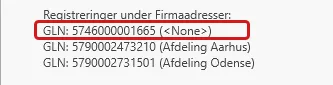
In the example below, the departments Aarhus and Odense are registered with their own gln number.

If a gln number is stated as <None>, it is because it is not stated anywhere in Uniconta, but it is still registered on the current Uniconta account.
This will happen if you delete a gln number in Uniconta without first unregistering it via NHR.